Here's a number that should make any marketer wince: on average, email lists decay by roughly 22% a year. People switch jobs, abandon inboxes, or type "gmial.com" without noticing. None of that is your fault, but every bounce it causes still lands on your sender reputation.
Send to enough dead addresses and inbox providers stop giving you the benefit of the doubt. Your emails are landing in spam folders, even for subscribers who genuinely want to hear from you. And if you're paying per contact or per send, you're footing the bill for messages that were never going to be read in the first place.
The fix isn't a one-time list scrub. It's building validation directly into how addresses enter, and stay in, your system.
Why Email Validation Matters More Than Ever in 2026
Bounces are the obvious cost. Most email service providers watch your bounce rate over a rolling window, and once you're consistently landing in the 2–5% range, that's generally treated as a warning sign worth acting on.
But bounces aren't actually the metric that gets you throttled or blocked these days; complaints are. Since Google and Yahoo rolled out their bulk sender requirements, the number that matters most is your spam complaint rate: stay under 0.10%, and you're in good shape, but cross 0.30%, and you risk real deliverability consequences, regardless of how clean your list looks otherwise. A list full of invalid or disengaged addresses tends to push both numbers in the wrong direction at once: more bounces and more complaints from spam traps and recycled addresses that were never yours to email.
Then there's the plain cost of it. Most platforms, like MailerLogic, include pricing around contacts sent or emails delivered. Every invalid address on your list is a line item you're paying for with zero chance of a return.
A validation system built the right way catches typos at signup, flags disposable and catch-all addresses before they cause trouble, and keeps spam traps from quietly poisoning your sender reputation. That's a meaningfully better position to be in than cleaning up after a bounce spike has already happened.
What a Real Email Validation System Actually Checks
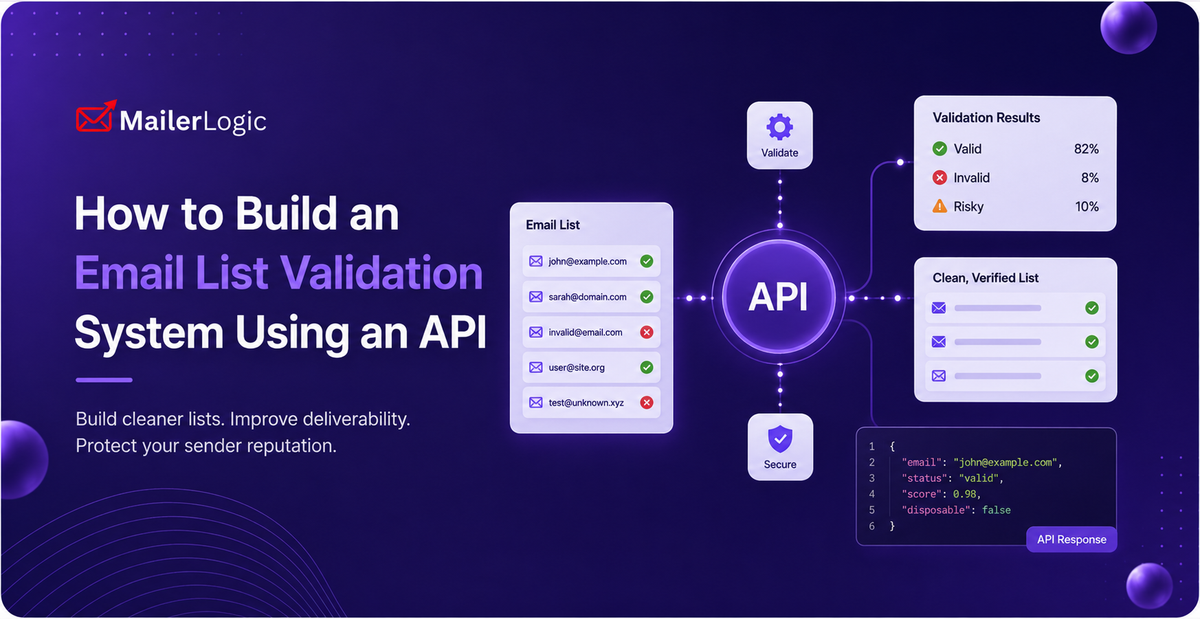
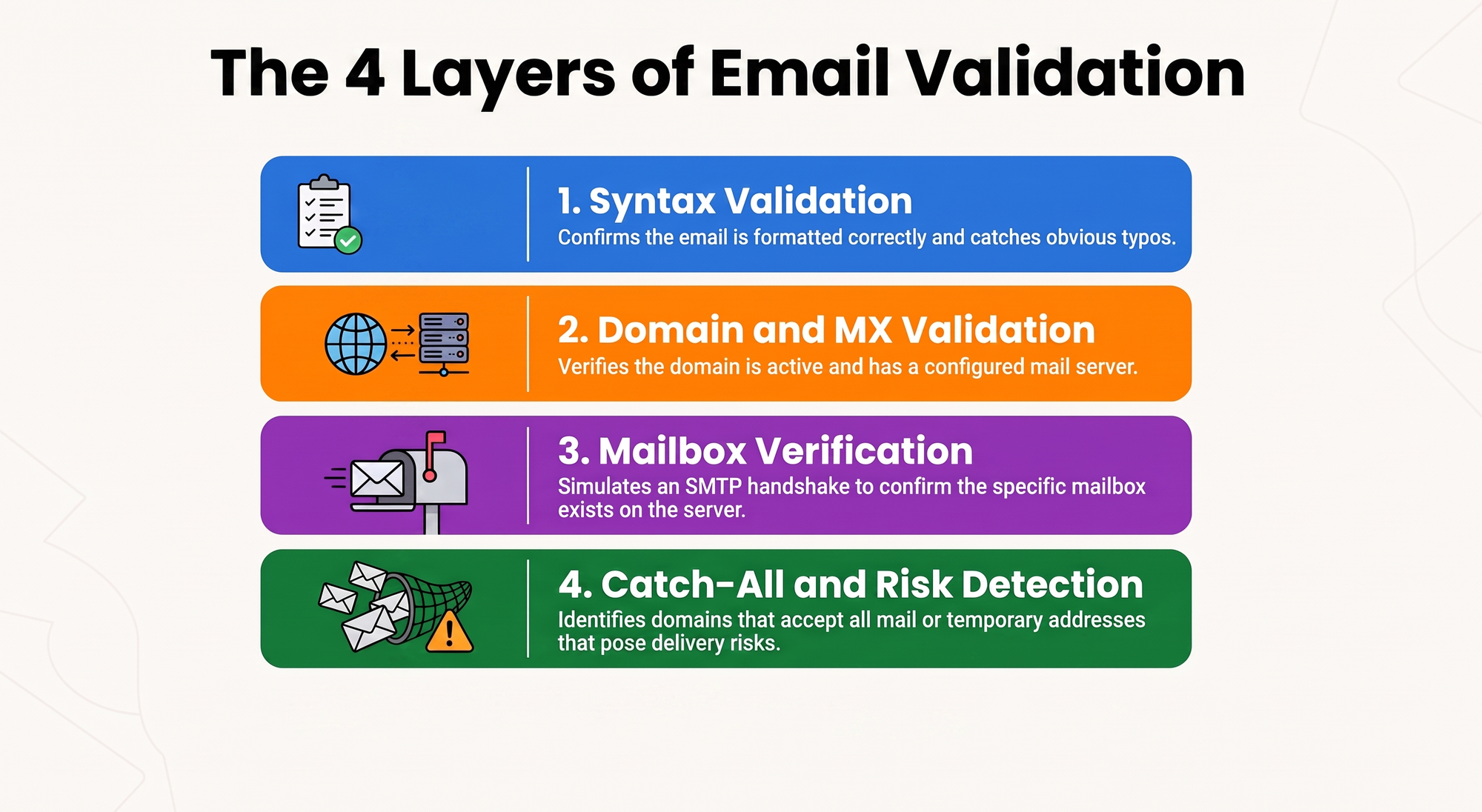
Before writing any code, it helps to know what "validation" is actually doing under the hood. A solid validation layer, like the one built into MailerLogic's Email Validation & Risk Assessment API, runs an address through several checks, not just one:
Syntax validation confirms the address is formatted correctly. It's the easiest check to run and the first thing that catches an obvious typo, but it won't tell you whether the address actually exists.
Domain and MX validation checks whether the domain is real and whether its DNS records point to a mail server that can actually receive email. An address can be perfectly formatted and still be undeliverable if the domain has no MX record.
Mailbox verification goes a step further and checks whether that specific mailbox exists on the receiving server, typically by simulating the early part of an SMTP handshake without actually delivering a message.
Catch-all detection flags domains configured to accept mail for any address at all, valid or not. These domains will say "yes" to almost anything you send them, which makes them genuinely tricky to validate- not invalid, exactly, but higher risk than a normal mailbox.
Disposable and risk detection flags addresses from known temporary email services, plus other risk signals- things that won't ever open a real campaign, however "valid" they look on paper.
Building Your Validation System, Step by Step
Step 1: Pick Real-Time, Batch, or Both
Real-time validation runs at the moment someone signs up, while they're still on the page and able to fix a typo. Batch validation runs against a list you already have, an imported CSV, a list you haven't touched in a while, or a scheduled cleanup.
Most teams end up needing both. Real-time validation keeps bad addresses from getting in the door in the first place; batch validation deals with everything that came in before you had that gate in place, plus the slow decay that happens to any list over time.
Step 2: Connect the Validation API
Here's a real-time validation function built against MailerLogic's API. The shape below matches how MailerLogic's API is structured: a X-API-Key header for authentication and a base URL under api.mailerlogic.net but check the current field names in your MailerLogic dashboard docs before shipping, since API responses evolve.
// Configuration
const MAILERLOGIC_API_KEY = process.env.MAILERLOGIC_API_KEY;
const MAILERLOGIC_API_URL = 'https://api.mailerlogic.net/v1/email-validation';

// Real-time validation function
async function validateEmail(email) {
  try {
    const response = await fetch(MAILERLOGIC_API_URL, {
      method: 'POST',
      headers: {
        'X-API-Key': MAILERLOGIC_API_KEY,
        'Content-Type': 'application/json'
      },
      body: JSON.stringify({ email })
    });

    const result = await response.json();

    // Field names below are illustrative — confirm exact response
    // shape against your MailerLogic API reference before going live.
    return {
      email: email,
      isValid: result.deliverability === 'deliverable' && !result.is_disposable,
      details: {
        syntax: result.syntax_valid ?? false,
        domain: result.mx_found ?? false,
        catchAll: result.is_catch_all ?? false,
        risk: result.risk_level,
        healthScore: result.health_score // MailerLogic's 0–100 deliverability signal
      },
      recommendation: determineRecommendation(result)
    };
  } catch (error) {
    console.error('Validation error:', error);
    return {
      email: email,
      isValid: false,
      error: 'Validation service unavailable'
    };
  }
}

function determineRecommendation(result) {
  if (result.deliverability === 'deliverable' && !result.is_disposable) {
    return 'accept'; // Valid, deliverable address
  } else if (result.deliverability === 'risky' || result.is_catch_all) {
    return 'review'; // Catch-all or uncertain — worth a second look
  } else {
    return 'reject'; // Invalid or disposable
  }
}
If you're integrating a different validation provider, the logic above still applies almost unchanged; you're just swapping the URL, the auth header, and the field names in the response.
Step 3: Add Rate Limiting and Retry Logic
APIs including MailerLogic's, enforce rate limits, and a validation system that ignores them will start failing requests under load. A simple queue with a minimum interval between calls handles this cleanly:
class ValidationRateLimiter {
  constructor(requestsPerSecond = 10) {
    this.minInterval = 1000 / requestsPerSecond;
    this.lastRequest = 0;
    this.queue = [];
    this.processing = false;
  }

  async enqueue(validationFn) {
    return new Promise((resolve, reject) => {
      this.queue.push({ validationFn, resolve, reject });
      this.process();
    });
  }

  async process() {
    if (this.processing || this.queue.length === 0) return;
    this.processing = true;

    while (this.queue.length > 0) {
      const now = Date.now();
      const elapsed = now - this.lastRequest;

      if (elapsed < this.minInterval) {
        await new Promise(r => setTimeout(r, this.minInterval - elapsed));
      }

      const { validationFn, resolve, reject } = this.queue.shift();
      try {
        this.lastRequest = Date.now();
        const result = await validationFn();
        resolve(result);
      } catch (error) {
        reject(error);
      }
    }

    this.processing = false;
  }
}
Step 4: Handle Batch Validation for Existing Lists
Cleaning an existing list means validating hundreds or thousands of addresses without hammering the API or losing track of progress. Chunk the list, respect the rate limit between batches, and report progress as you go:
async function batchValidateEmails(emailList, onProgress) {
  const results = [];
  const batchSize = 100;
  const delayMs = 100; // Respect rate limits

  for (let i = 0; i < emailList.length; i += batchSize) {
    const batch = emailList.slice(i, i + batchSize);

    const batchResults = await Promise.all(
      batch.map(email => validateEmail(email))
    );

    results.push(...batchResults);

    if (onProgress) {
      onProgress({
        completed: results.length,
        total: emailList.length,
        percentage: Math.round((results.length / emailList.length) * 100),
        validCount: results.filter(r => r.isValid).length,
        invalidCount: results.filter(r => !r.isValid).length
      });
    }

    if (i + batchSize < emailList.length) {
      await new Promise(r => setTimeout(r, delayMs));
    }
  }

  return results;
}
Step 5: Wire Validation Into Your Suppression Workflow
This is the step teams skip most often, and it's the one that actually makes validation worth doing. Running a check is only useful if something happens with the result.
Automatic suppression. Addresses that come back invalid or disposable should be suppressed automatically rather than left to bounce later. MailerLogic's automatic bounce handling does this natively on the sending side: hard bounces are blocked instantly, and soft bounces are retried intelligently before an address is added to your suppression list, so a slow mail server doesn't get treated the same as a dead one.
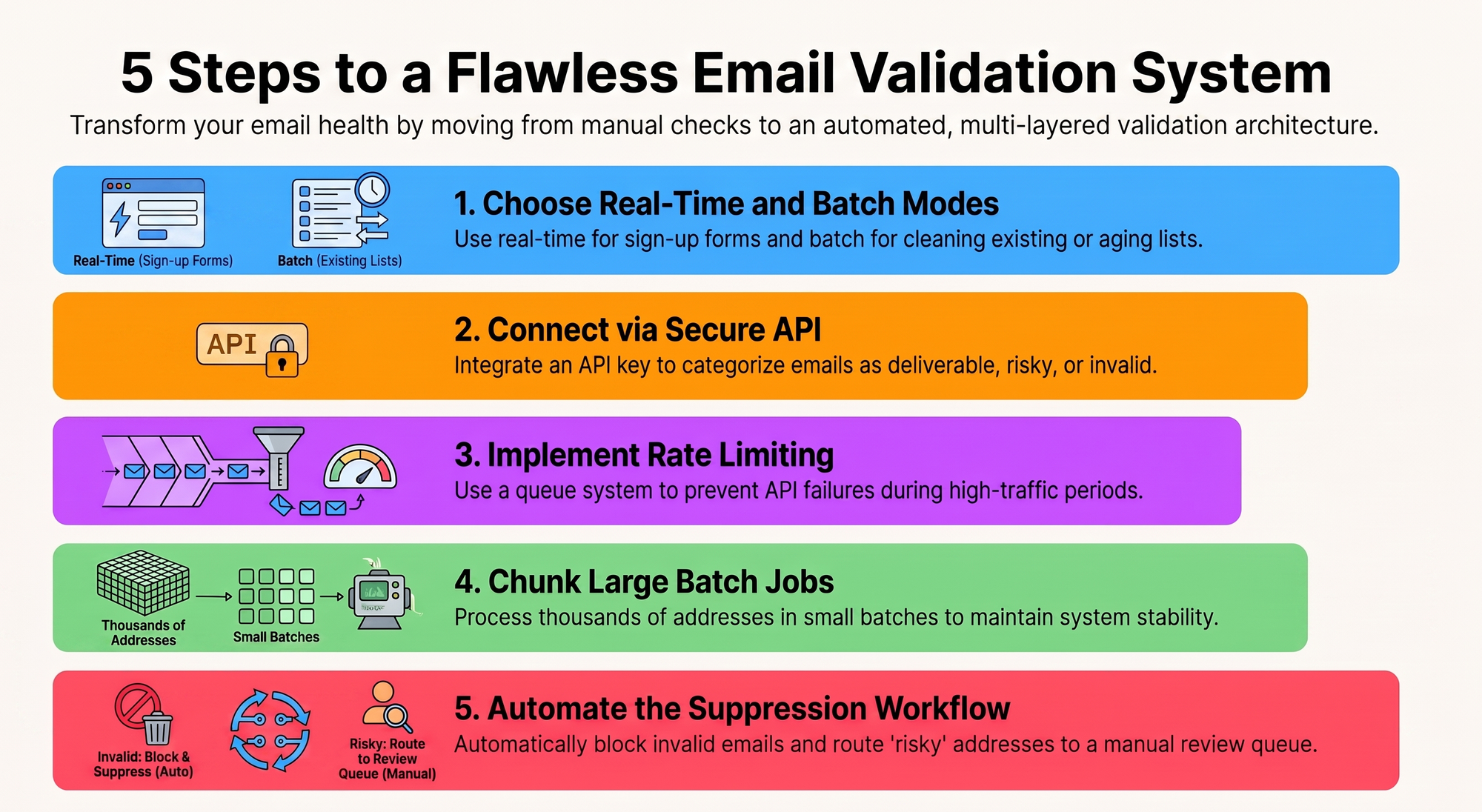
A review queue for the gray area. Addresses flagged as "risky", catch-all domains, brand-new domains with no history, aren't necessarily bad, just uncertain. Route these somewhere a human glances at them rather than auto-rejecting or auto-accepting.
Store results with a timestamp. Validity isn't permanent. Domains expire, mailboxes get abandoned, and new disposable services pop up constantly. An address that validated cleanly six months ago isn't guaranteed to validate cleanly today, so treat every result as time-stamped, not evergreen.
Real-World Example: Signup Form Integration
Here's how it comes together on a signup form:
async function handleSignup(email) {
  // Step 1: Validate in real time
  const validation = await validateEmail(email);

  // Step 2: Act on the result
  switch (validation.recommendation) {
    case 'accept':
      await createUser(email);
      return { success: true, message: 'Welcome aboard!' };

    case 'review':
      await createUser(email, { emailValidationFlag: 'review' });
      await sendAdminAlert('Review needed', email);
      return {
        success: true,
        message: 'Account created. Please check your inbox for confirmation.'
      };

    case 'reject':
      return {
        success: false,
        message: 'Please enter a valid email address.',
        code: 'INVALID_EMAIL'
      };
  }
}

Best Practices for Keeping Your List Clean Long-Term
Building the system is the start, not the finish line. A few habits keep it working:
Re-validate on a schedule, not just at signup. Run your full list through validation every quarter or so. A list that was clean in January can have a meaningful chunk of dead addresses by summer; people change jobs, abandon inboxes, and switch providers constantly.
Watch actual bounces, not just validation scores. Validation is a prediction, not a guarantee. If MailerLogic's webhooks tell you an address just bounced, that's better information than a validation check run weeks earlier; act on it immediately rather than waiting for the next batch cleanup.
Segment by confidence, not just valid/invalid. A corporate address with two years of consistent opens is a different asset than a personal address that validated an hour ago and has never opened anything. If your platform surfaces a deliverability or health score, MailerLogic scores domain and sender health on a 0–100 scale as part of its deliverability intelligence, use it to prioritize who gets your best content and your most aggressive sends.
Don't let validation get in the way of real people. Aggressive validation that repeatedly bounces a legitimate signup back to the user is a conversion killer. Where you can, guide rather than block: "Did you mean john@company.com?" converts better than a flat rejection.
Conclusion
Email list validation has become infrastructure, just like authentication or error logging. Get it wrong, or skip it, and it shows up as a slow bleed in deliverability, sender reputation, and the money spent emailing addresses that were never going to open anything.
Start with real-time validation at signup so bad addresses stop entering the funnel. Layer in batch validation for what's already there. And whatever platform you're on, make sure validation actually feeds a suppression workflow; a check that doesn't lead to action is just a report nobody reads. Do that, and your bounce rate, your sender reputation, and your budget will all be better for it.