Your Email List Is Your Most Valuable Asset
Every successful email campaign starts somewhere most marketers treat as an afterthought: a clean, engaged subscriber list. You can write killer subject lines, design pixel-perfect templates, and offer discounts that would make your CFO weep. None of it matters if your messages land in spam.
List management isn't a one-and-done project. It's a daily discipline that shapes your sender reputation, deliverability rates, and, ultimately, your ROI. Here's the playbook I use with clients, from 500-person lists to half a million. These practices separate senders who see the inbox from those who see nothing.
How List Management Hits Deliverability
Let's get tactical. Why do mailbox providers care so much about list hygiene?
When an ISP decides whether to inbox, spam-folder, or reject your email, they're looking at a handful of signals:
Bounce Rate
How many emails fail outright?
Spam Complaints
Are recipients marking emails as spam?
Engagement
Are opens, clicks, and replies genuine?
List Quality
Are your contacts valid and verified?
Bad list management torpedoes all four. Sending to invalid addresses spikes your bounce rate. Emailing people who never engage tanks open rates and invites spam complaints. Failing to honor an unsubscribe can get you blocklisted faster than you can say "sender reputation."
Consistent hygiene? It protects your reputation and, over time, makes inbox placement almost boringly reliable.
Building a Clean List From Day One
Use Double Opt-In. No Exceptions.
The single most impactful decision you'll make happens at the signup form. Double opt-in requires a subscriber to confirm their address via a verification link before you ever send them a campaign.
This one step kills:
- Typos and fake addresses
- Bot signups
- People who "helpfully" entered their boss's email
- Subscribers who will never engage
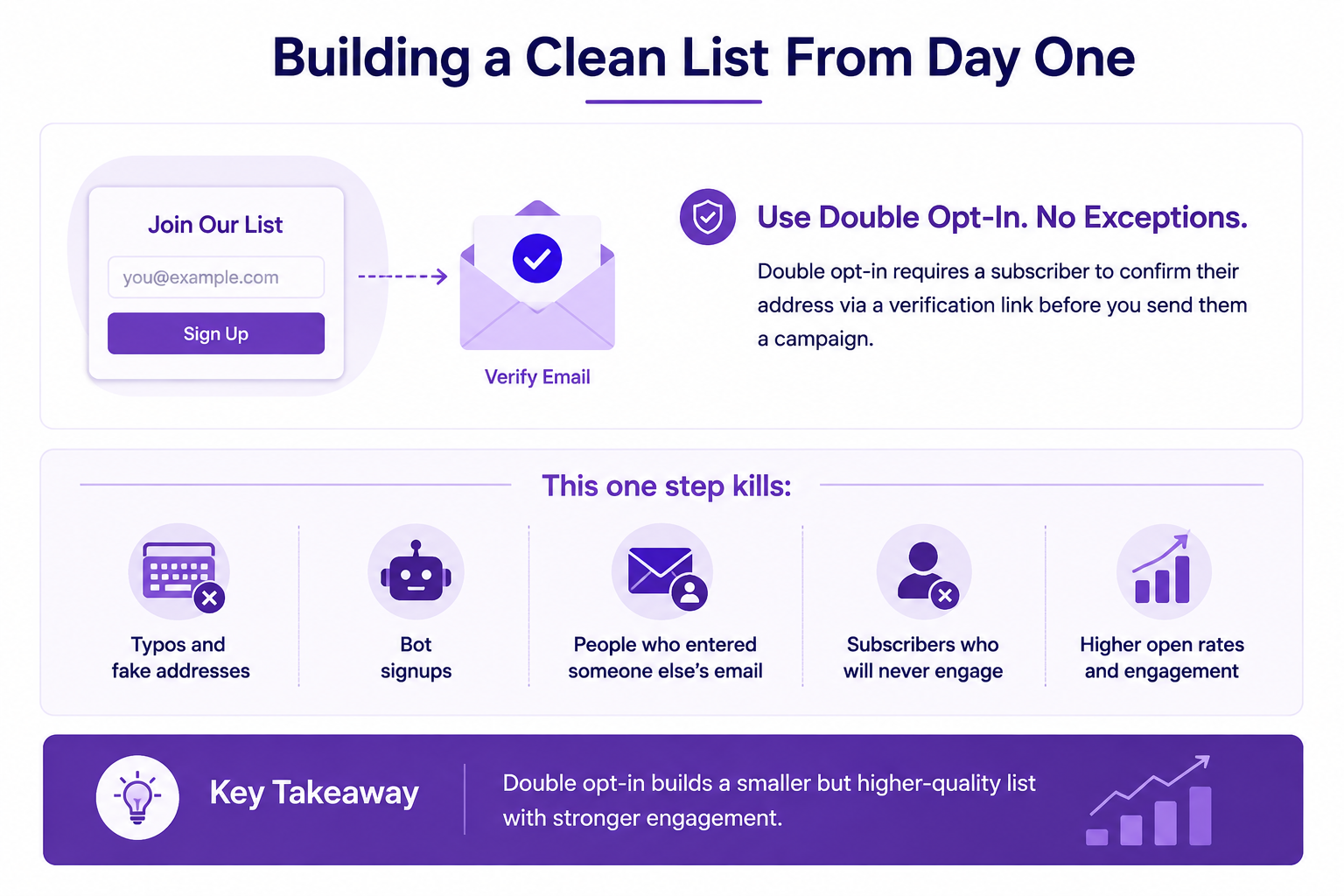
You'll collect fewer total subscribers. But the ones you keep actually want your emails. A large-scale analysis of billions of newsletters by GetResponse found double opt-in lists averaging a 35.7% open rate versus 27.4% for single opt-in, roughly a 30% relative lift, consistent with what we see across client accounts.
One nuance worth knowing: that same research found double opt-in does not reliably lower spam complaint rates; in some segments, it was actually slightly higher, likely because double opt-in subscribers are more actively engaged and more willing to take any action, including hitting "report spam" instead of unsubscribing. So sell double opt-in on list quality and engagement, not as a spam-complaint fix; that part needs its own safeguards (see the unsubscribe section below).
Set Expectations at Signup
Tell people exactly what they're signing up for. How often. What kind of content. Why they'll care. When expectations are this clear, people rarely mark you as spam. They unsubscribe instead, and that's exactly what you want.
CAPTCHA and Form Validation
Add reCAPTCHA or a honeypot field to block bots. If you're pulling signups from a third-party form or integration, validate the data thoroughly before it hits your email platform. One corrupted import can wreck a month's bounce rate.
Ongoing List Hygiene: The Routine
Remove Invalid and Inactive Addresses Monthly
Hygiene isn't a spring cleaning event. It's monthly maintenance. Here's what to hunt down:
Hard bounces: Permanent failures. Address doesn't exist, domain is dead, mailbox closed. Remove them immediately. Most modern email platforms, MailerLogic included, automatically suppress hard-bounced addresses so you can't accidentally mail them again. [[VERIFY INTERNALLY: confirm MailerLogic auto-suppresses hard bounces by default and describe the exact trigger, e.g. after 1 hard bounce.]]
Soft bounces: Temporary hiccups. Full inbox, server down, oversized message. One soft bounce is fine. But repeated consecutive soft bounces from the same address is a problem, and MailerLogic will automatically suppress the address once it crosses that threshold. [[VERIFY INTERNALLY: confirm the exact consecutive-soft-bounce count MailerLogic uses to trigger auto-suppression — the original draft said "three to five," which needs a specific, confirmed number before publishing.]]
Role-based addresses: info@, sales@, admin@. These aren't individual people. They generate lower engagement and higher complaint rates. Segment them out or exclude them entirely from marketing campaigns.
Watch That Bounce Rate Like a Hawk
Your bounce rate is one of the loudest signals ISPs use to judge you. Here's a widely used industry benchmark:
- Below 2%: You're healthy. Keep going.
- 2% to 5%: Warning zone. Clean house now.
- Above 5%: Danger. Deliverability problems are imminent, and blocklisting might follow.
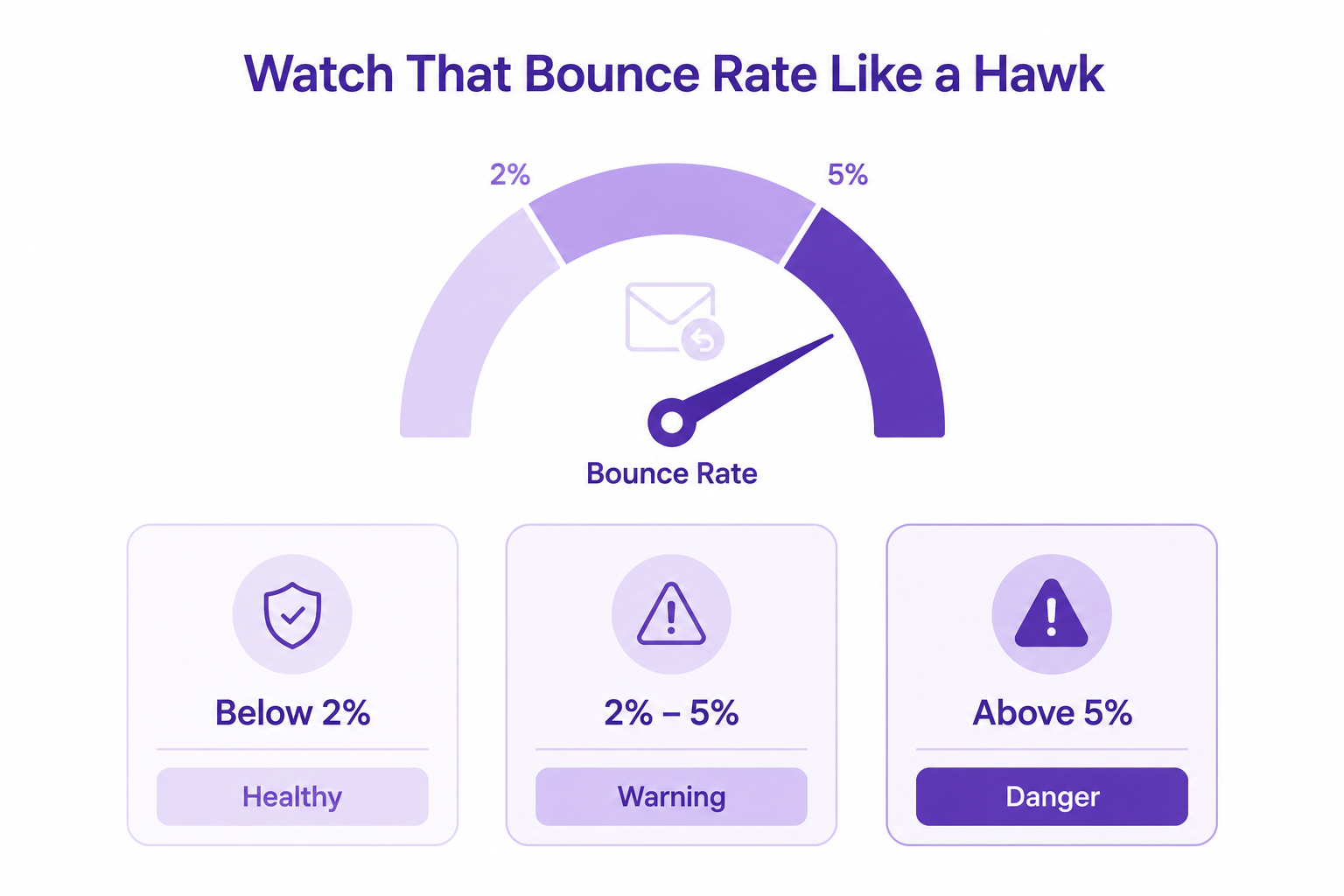
Review your bounce rate after every campaign, and don't let one bad send sit unaddressed; a spike can drag down your rolling average and your reputation for weeks. (If you want to cite a specific rolling-window figure, e.g. 30 days, confirm that's the window MailerLogic's reporting actually uses before publishing; this varies by platform and wasn't independently confirmed.)
Set Up a Custom Bounce Domain
This little trick is often overlooked. Instead of processing bounces through shared infrastructure, route them through your own subdomain, like bounce.yourdomain.com.
What you get:
- Your bounce reputation stays separate from other senders on shared infrastructure.
- Cleaner visibility into your own bounce data.
- One more piece of a fully authenticated sending setup.
One correction to a common myth: a custom bounce/return-path domain by itself does not remove the "via [provider]" label Gmail sometimes shows next to your sender name. That label is controlled by DKIM specifically, whether your messages are DKIM-signed with a signature aligned to your actual sending (From) domain. Set up DKIM alignment for that; set up a custom bounce domain for cleaner reputation and reporting. Do both; just don't expect the bounce domain alone to fix the "via" label.
Set this up early. It's a technical detail that pays dividends over the years.
Managing Unsubscribes the Right Way
Make Leaving Stupidly Simple
I know it sounds backwards, but easy unsubscribe is a deliverability superpower.
When someone wants off your list but can't find how, they've got one move left: the spam button. A spam complaint hits your sender reputation far harder than an unsubscribe. It compounds over time and can tank your entire domain, and as noted above, double opt-in alone won't protect you from this.
Unsubscribe best practices:
- Put the link in the header or footer of every email. No hunting.
- Use one-click unsubscribe (required by Gmail and Yahoo since February 2024 for anyone sending 5,000+ messages a day to their users, via the RFC 8058 List-Unsubscribe header, not just a mailto link).
- Process requests fast. Google's own bulk-sender rules require removal within 48 hours, but don't treat that as your target; process as close to immediately as your platform allows.
- Never gate it behind a login, survey, or cleverness.
Offer a Frequency Choice, Not Just Goodbye
A preference center, letting people drop from daily to weekly, or choose topics, instead of leaving entirely, is consistently cited across ESP research as a meaningful way to reduce full unsubscribes, with figures in the 10–30% range depending on list and industry. Someone who stays on weekly is still a valuable subscriber. They just needed less volume.
Handle Bulk Unsubscribes Cleanly
If you're running a re-permission campaign and need to suppress a chunk of people, do it neatly. In MailerLogic, you can bulk-unsubscribe through the contact interface, then re-subscribe people later if they confirm interest.
[[VERIFY INTERNALLY: confirm this exact workflow, bulk unsubscribe via the contact interface, with a re-subscribe path, matches current MailerLogic UI before publishing.]]Re-Engagement and the Art of the Sunset
Spot Disengaged Subscribers Before They Become Dead Weight
Not every subscriber who goes quiet has abandoned you. Maybe they're busy. Maybe they changed email clients. But after 60–90 days of zero opens or clicks, you need to treat them differently.
Active
Warm
Cooling
Inactive
That's a common window for B2B or content-driven email. E-commerce might tighten it to 60 days. Pick your threshold and stick with it.
Run Re-Engagement Campaigns That Don't Feel Desperate
Before you suppress inactive subscribers, give them one last shot. A good re-engagement email includes:
- A subject line that acknowledges the gap ("We miss you" or "Is it time to part ways?") without begging.
- A clear, one-sentence value prop for staying.
- A big, obvious button to confirm continued interest.
- A deadline: "If we don't hear back in 14 days, we'll stop emailing."
No response? Suppress them. No emotion, just data.
Enforce a Sunset Policy, No Exceptions
A sunset policy is your safety net. It says: after X days of inactivity, a subscriber is automatically suppressed. Set X based on your business rhythm: 90 days, 180 days, whatever makes sense, but once you choose, enforce it ruthlessly.
I've seen marketers hesitate because they're attached to list size. Forget that. A smaller, engaged list crushes a big, dead one every single time. Every send counts.
Segment for Engagement, Not Just Demographics
Send to Your Most Engaged Subscribers First
When you launch a campaign, mailbox providers watch the first few minutes. If early responses are strong- good open rates, clicks, replies your sender reputation gets a boost that lifts deliverability for the rest of the send.
That's why you should send to your most engaged segment first, then gradually roll out to cooler cohorts. It's a simple trick that many senders overlook.
Behavioral Triggers Over Blast-and-Pray
Stop blasting everyone with the same email. Use behavioral data:
- Purchases: Trigger follow-up content related to what they bought.
- Website visits: Automate emails based on pages they hit.
- Email engagement: Move subscribers between segments automatically based on opens and clicks.
Every message becomes context-aware. Relevance drives engagement, and engagement tells ISPs you're a sender worth trusting.

Technical Foundations: Authentication and Infrastructure
You Can't Skip Authentication
Even the cleanest list won't save you if your domain isn't authenticated. At a minimum, you need:
- SPF (Sender Policy Framework): A DNS record that lists which mail servers are allowed to send email on behalf of your domain.
- DKIM (DomainKeys Identified Mail): A cryptographic signature attached to each message that lets mailbox providers verify it actually came from you and wasn't altered in transit.
- DMARC (Domain-based Message Authentication, Reporting & Conformance): A policy layered on top of SPF and DKIM that tells mailbox providers what to do when a message fails those checks (quarantine, reject, or do nothing), and gives you reporting on authentication failures.
Google and Yahoo's current bulk-sender requirements, which apply to anyone sending 5,000+ messages a day to their users, require valid SPF, DKIM, and at least a p=none DMARC policy, with the domain in your "From" header aligned to your SPF or DKIM domain. Below those volumes, it's not strictly mandatory, but at this point it's the baseline for reliable inbox placement regardless of your sending volume. No authentication? You look suspicious by default, regardless of list quality. Set these up before you send another email.
Use Webhooks for Real-Time Monitoring
Waiting until next week's report to discover a bounce spike is amateur hour. Real-time webhooks let you react in seconds.
When a bounce hits, a webhook can:
- Log the event with the recipient, bounce type, and reason.
- Update the subscriber's status in your CRM.
- Add the address to a suppression list.
- Alert your team if the bounce rate crosses a threshold
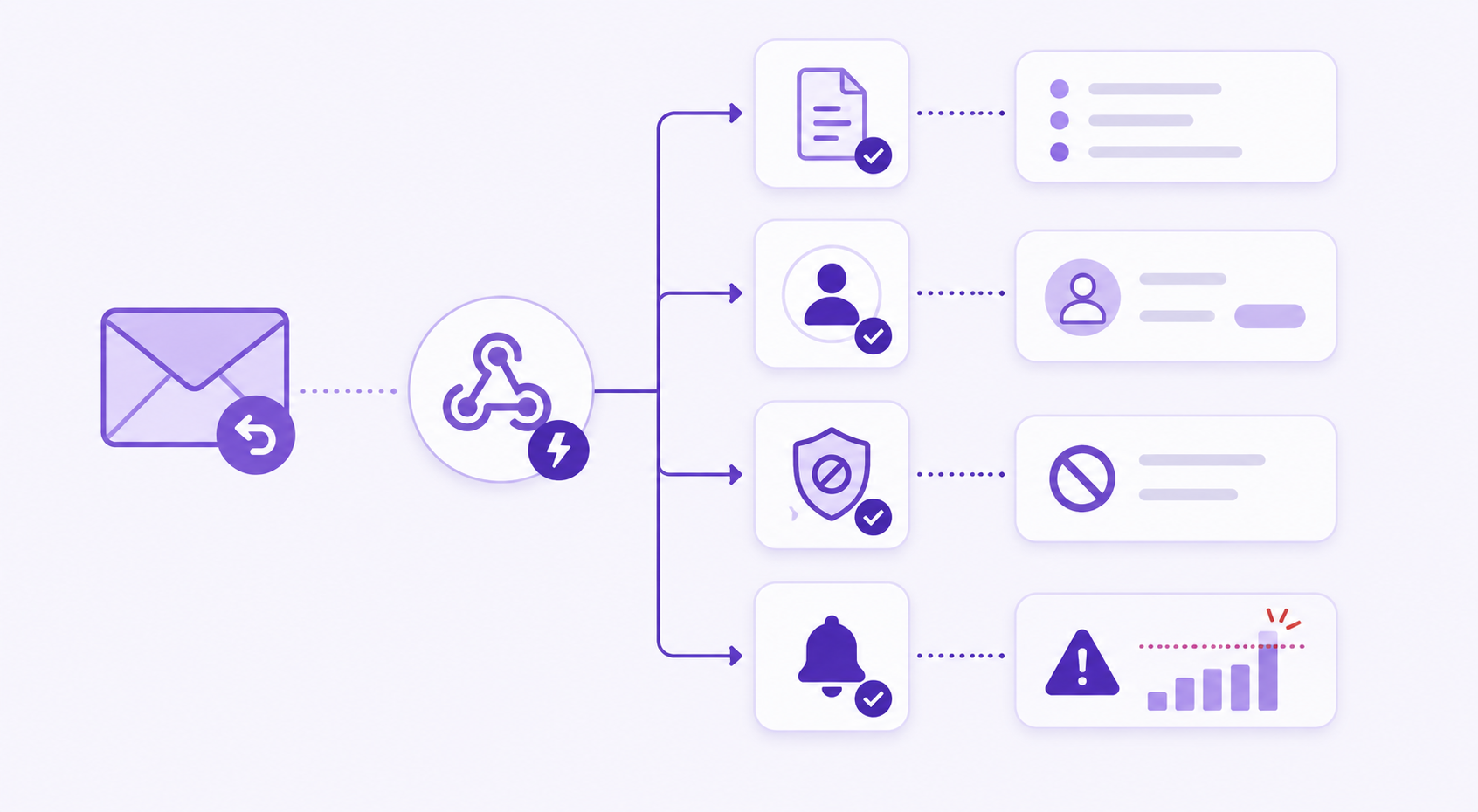
This keeps your list clean without manual intervention after every campaign. Set it once, and let automation do the heavy lifting.
Common Mistakes That Still Trip Up Experienced Senders
Buying or renting lists. Purchased lists are landmines: invalid addresses, spam traps, people who never opted in. One send to a bought list can crater your reputation. It's never worth it.
Ignoring spam traps. ISPs and blocklist operators seed these addresses to catch senders scraping or buying lists. Even one hit is painful. If your hard bounce rate suddenly jumps, you might have stumbled into one.
Letting bounce rates climb. A bounce rate over 5% signals neglect to mailbox providers. They will throttle or reject you. Fix it before you're forced to.
Skipping sunset policies. Subscribers who haven't engaged in six months aren't coming back. Keeping them on your list drags down every metric you care about. Suppress them, and watch your deliverability climb.
The Bottom Line
None of this is glamorous. Double opt-in, monthly bounce cleanup, sunset policies, SPF and DKIM records- it's maintenance work, not campaign strategy, and it rarely gets credit when it's working. But it's the reason two senders with identical subject lines and nearly identical lists can get completely different results: one lands in the inbox, the other lands in the spam folder, and no amount of clever copy fixes that after the fact.
Treat list hygiene and authentication as infrastructure, not a checklist you run once. Build the habits, clean monthly, watch your bounce rate after every send, make unsubscribing effortless, enforce your sunset policy without exception, and inbox placement stops being a mystery and starts being a predictable outcome of the work you've already done.